I Built a Graph View for Notion


Recently, as I've been using AI and LLMs for personal work, building your own knowledge base (a second brain) has become something of a trend.
This is the 'LLM Wiki.' The leading tools in this space are Obsidian and Notion.
I wanted to build a Notion with nothing to envy in Obsidian
Notion has a clean UI, makes building databases easy, and integrates well with external services.
For a modest fee, you can use this incredibly useful tool to your heart's content.
(I too have been happily building my personal wiki on top of Notion.)
But there was always one personal frustration that remained.
It was the lack of a 'graph view' that visually shows the connections between documents.
Because of this single flaw, Notion always ended up taking a back seat to Obsidian.
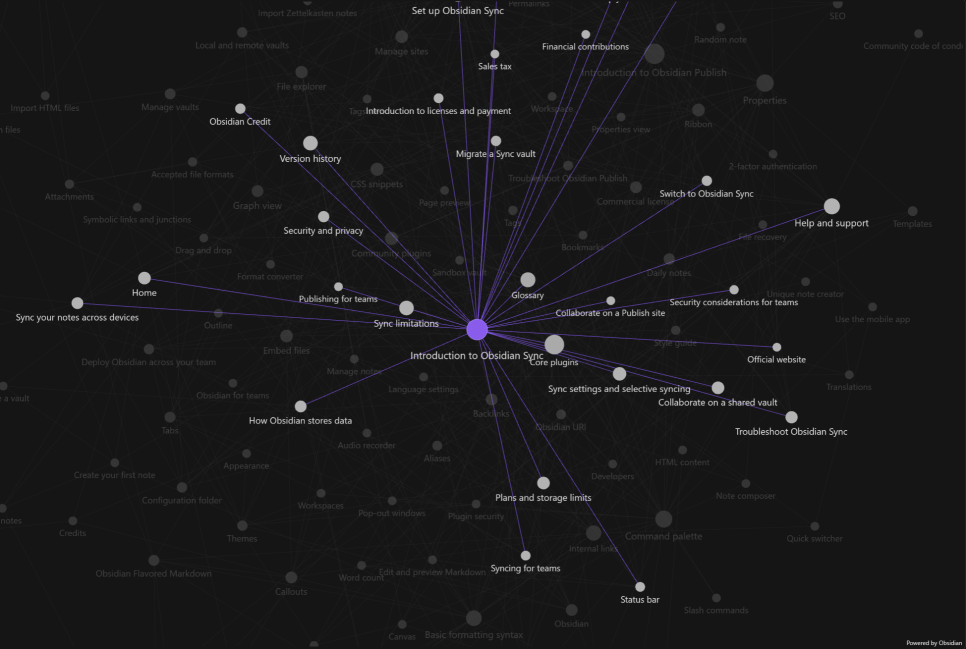
In a way, the graph view was Obsidian's best weapon — killer content that overwhelmed all of Notion's other advantages.
Maybe that's why I've never once seen a YouTube video talk about LLM wikis without mentioning Obsidian.
In my opinion, though, Obsidian doesn't offer a database environment as flexible and convenient as Notion's.
The pros, cons, and trade-offs were so stark that choosing between them wasn't easy.
It was a bit like agonizing over pizza versus jeyuk-bokkeum (spicy stir-fried pork).
I wanted the jeyuk...
But what do you do when you also want pizza?
The answer is very simple.

You make a bulgogi pizza.
Once pages pile up into the hundreds, it becomes nearly impossible to grasp the entire structure in your head alone.
With the sole purpose of not losing my way,
visualizing Notion's page data by grouping it into nodes, just like Obsidian does,
I designed a very lightweight pipeline.
I traversed the page tree using the Notion API to collect nodes and edges,
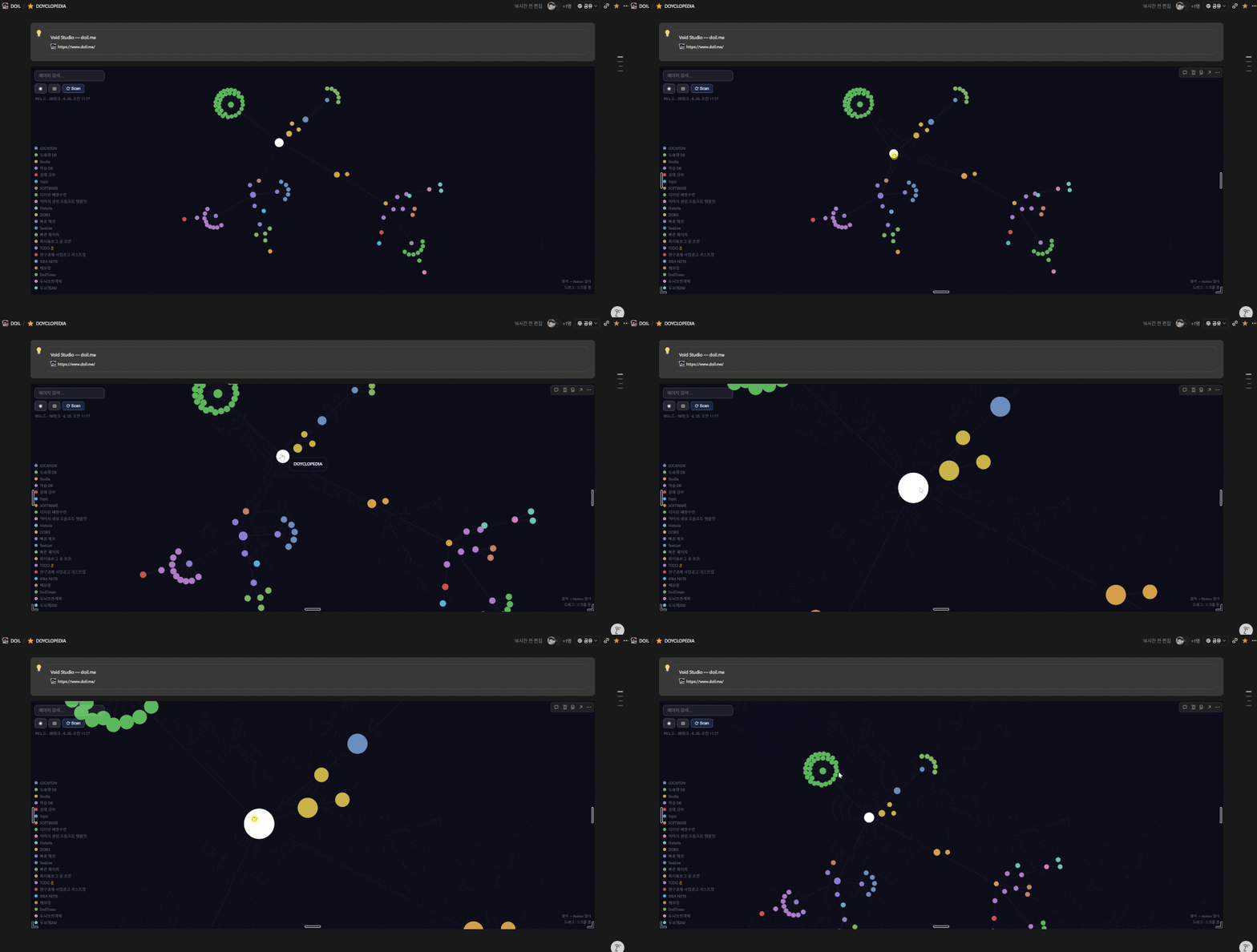
rendered them with D3.js, and put it up at /graph.
Then I embedded the graph inside Notion pages using an embed block.
This set up a structure where you could see, right on screen, how a page's sub-structure organically interconnects.

Technical Debt Born of Simplicity

The initial implementation was extremely simple.
The node and edge data obtained by traversing the Notion API
was serialized wholesale into a single file called notion_meta.json.
When reading, I parsed and loaded the entire file,
and when writing, I appended the changes and overwrote the entire file anew.
Because the structure was so simple, it took less than 10 minutes to get the first page up and running.
But as data gradually accumulated, this simplicity soon came back to bite me.
Inefficient full reads: even to look up a single node, I had to parse the entire tens-of-megabytes JSON file every time.
Lack of an index: searching for nodes in a specific group required a full scan of the entire array from start to finish every time.
Concurrency risk: if a read request came in from the frontend while Notion data was being scanned and written to the file in the background, there was a precarious window where you could read corrupted data or an incomplete file state.
No incremental updates: even when just one sub-document was added, adding a single edge line, the entire heavy JSON had to be rewritten every time.
To solve this bottleneck, there were roughly three alternatives I could think of.
Adopt a DB stack well-suited to storing JSON (PostgreSQL with its JSON type support, or a NoSQL-based option like MongoDB, etc.)
Adopt an existing open-source embedded DB (NeDB, LowDB, or various SQLite wrapper libraries)
Build something custom-tailored to my needs (build a JSON indexing layer directly on top of SQLite)
Adding another DB stack just to manage some JSON data by spinning up an RDB or MongoDB?
That's the very essence of over-engineering.
牛刀割鷄 — why would you use an ox-cleaver to slaughter a chicken?

So the first thing I did was look into widely used, lightweight embedded databases.
NeDB was an attractive tool that let you handle JSON objects MongoDB-style, but unfortunately it was a legacy project whose maintenance had stopped long ago.
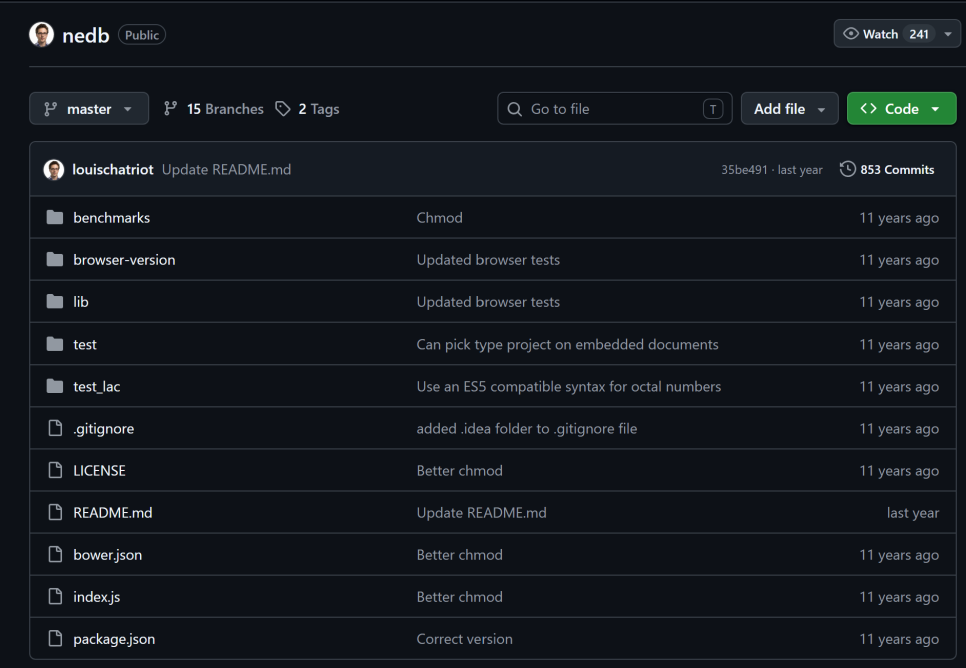
LowDB was intuitive, but internally it still worked by reading and writing the entire JSON file,
so it simply wasn't in the right weight class to solve the fundamental problems of concurrency and file bloat.
In the end, then, the answer was SQLite, the trusted standard for relational databases.
But the SQLite-related libraries out there were either mere SQL wrappers,
or handling the JSON data indexing and caching I needed meant writing the same redundant boilerplate code every time.
I eventually concluded, "If I'm going to use SQLite anyway, I might as well wrap it myself in an interface that suits my taste." Fortunately, the Node.js ecosystem already had better-sqlite3 standing by, boasting overwhelming speed thanks to its native bindings, so I was able to get set up quickly.
I laid out the core requirements for the library I was going to build.
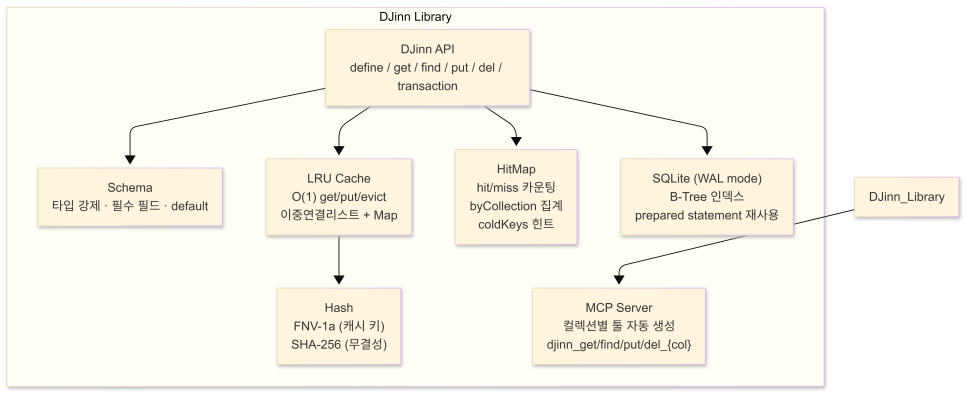
B-tree-based indexing: leverage the powerful indexes SQLite provides by default.
LRU cache: keep frequently queried results in memory to minimize disk I/O.
Custom hash functions: use FNV-1a to generate cache keys and SHA-256 to verify integrity.
HitMap: track how often each query hits, so cache efficiency can be seen at a glance.
I decided to split this tool out into an independent npm package so it could be usefully reused in future projects too.
DJinn — Doil's JSON Indexing Node
The name is DJinn (pronounced like "jinn").
It's short for Doil's JSON Indexing Node, while also being a pun on the genie of the lamp — the spirit from Middle Eastern mythology.
Roughly, it means something like "a devilishly good little thing."

A Record of Key Design Decisions and Trial and Error
- Schema design: why you must always return every field
In the early schema validation stage, if an optional field wasn't provided, I simply excluded that field at the database storage stage too.
But this approach threw errors in the better-sqlite3 environment.
A column-count mismatch error occurred in the prepared statement cache.
A prepared statement fixes the column structure and count from when the query was first compiled,
but since the number of columns in the query kept changing depending on the input data, the database engine couldn't keep up.
The fix turned out to be surprisingly simple.
I made the schema validator (validate()) explicitly fill in null even for optional fields with no value,
forcing it to always return an object containing every column defined in the schema.
Thanks to this rule, the data's structure stayed consistent at all times,
and prepared statements could now be safely reused.
- Cache key serialization: the trap dug by the array replacer
Caching requires "serializing" the query condition object into a unique key string.
At first I tried something lightweight, like using an array replacer such as JSON.stringify(query, ['id', 'grp']) to extract only specific keys and turn them into a cache key.
But this approach produced a fatal collision bug.
When serializing {id: 'abc'} and {grp: 'Studia'} separately,
even though they were different query conditions, the exact same serialized result came back.
The cause was simple.
The array replacer doesn't just filter the top-level object's keys — it operates identically at every depth of nested objects.
Because of this, even when parameter key names differed, if the value's structure and depth were similar, they'd get converted into the same output — that was the problem.
In the end, I switched to a more straightforward, orthodox serialization method.
First sort the query object's keys alphabetically,
then run the whole thing through JSON.stringify without any filtering at all, so as to obtain a canonical string.
- HitMap: an eye watching over cache efficiency
I felt that monitoring whether a cache is actually working well matters just as much as introducing it in the first place. (This was to visualize the LRU.)
DJinn has a built-in HitMap module that goes beyond a simple counter.
It accumulates hit/miss counts per query key in real time, and aggregates efficiency at the collection level via the byCollection() method.
It even lets you call coldKeys(n) to get hints about which queries have a low hit rate and are just wasting memory.
I thought this would serve as useful data for tuning the cache policy later on, once I ran into memory constraints.
Embedding It Into the Project
DJinn was packaged as an independent npm package (@d0iloppa/djinn),
and doil-sb, the service server, imports and uses it in routes/graph.js.
One important design principle here was separation of control.
The path where the database file is created and its specific name
were made to be decided entirely by the caller (in my case, doil-sb), not by the library.
const db = new DJinn(path.join(__dirname, '../data/notion_meta.db'));
I made sure that not a single line inside DJinn's own code hardcodes a file path or filename.
So even if I use DJinn in some other toy project or service down the line,
new DJinn('/another/path/meta.db')
a single constructor call like that lets me easily run a completely isolated, independent database.
Scanning Strategy
Even with the database in place, it's meaningless if the scanning process that syncs Notion's changes each time is inefficient.
The Notion API in particular is notorious for how slow its responses are. (It really does take forever.)
As pages increase, traversing the entire tree every single time is close to a waste of time.
That's exactly when the idea of a sub-scan came to me.
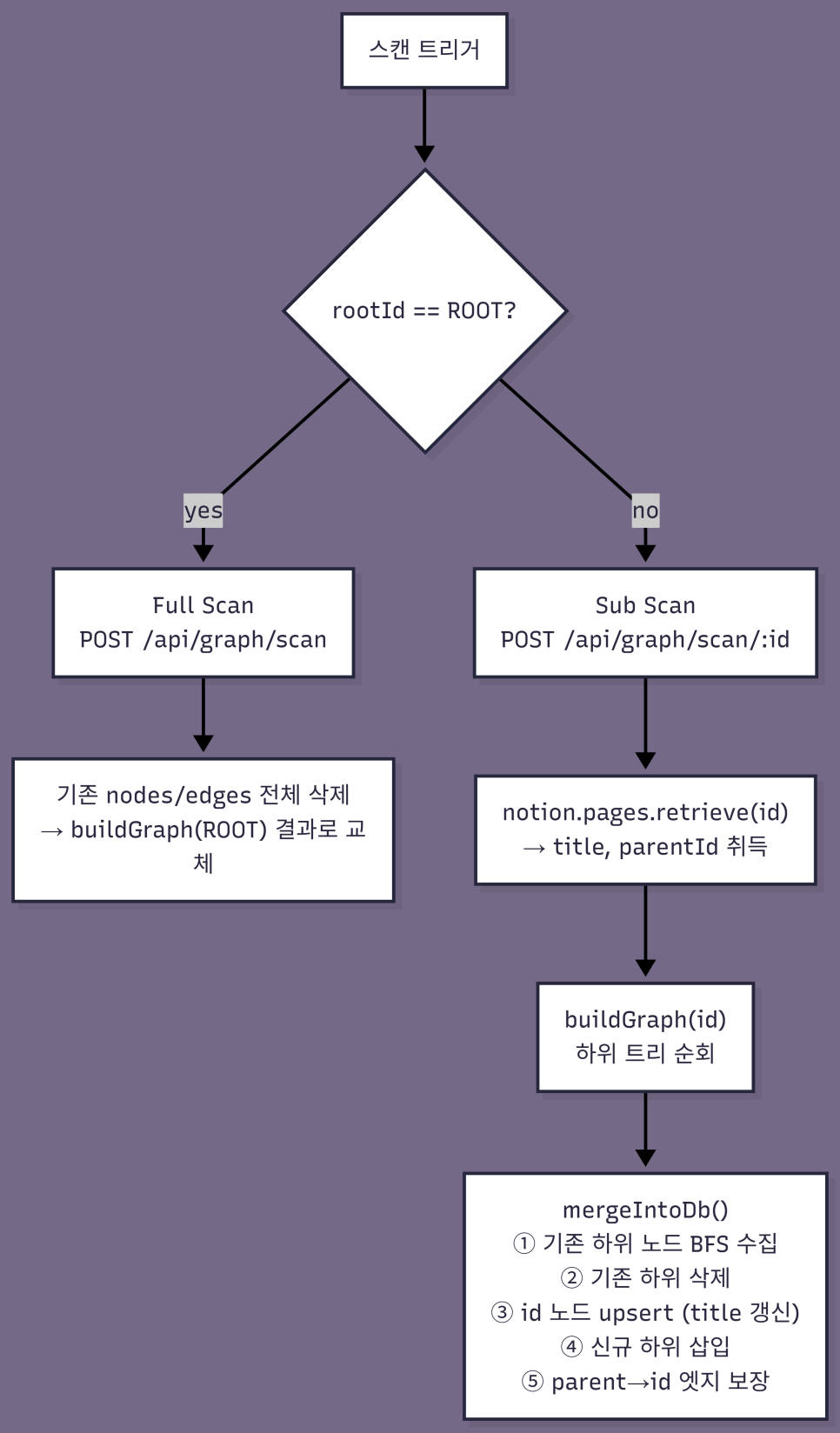

When you create a new page in Notion and press the button, the following asynchronous flow happens.
- When the hook fires, it immediately inserts an embed block into the Notion page and returns a 200 OK response right away.
This eliminates the physical waiting time where the user would otherwise sit staring at a loading bar.
Then, in the background, it calls
notion.pages.retrieve(id)to lightly look up the newly added page's actual title and parent ID (parentId).Only the child blocks that exist under the new page are recursively traversed with
buildGraph(id)to collect a partial graph structure.It cleans out the stale data that used to belong under that page in the existing DB, and fills it in with the newly collected data.
If the parent node is already registered in the DB, it creates a "parent → child" edge to preserve the continuity of the map.
With this approach, the user is shown a completion screen the instant they click the button, while the actual data update finishes precisely, asynchronously, behind the scenes.
MCP: How to Hand a Map to an AI
I found myself getting a bit of stubborn pride about everyone using nothing but Obsidian.
At first, I started this project with the sole purpose of a visual graph view just for myself.
Once I'd built it out, I could see the potential for it to also serve perfectly well as index data for an LLM wiki.
It also occurred to me that this data would be extremely useful to the AI agent (DOBIS) working away inside my server.
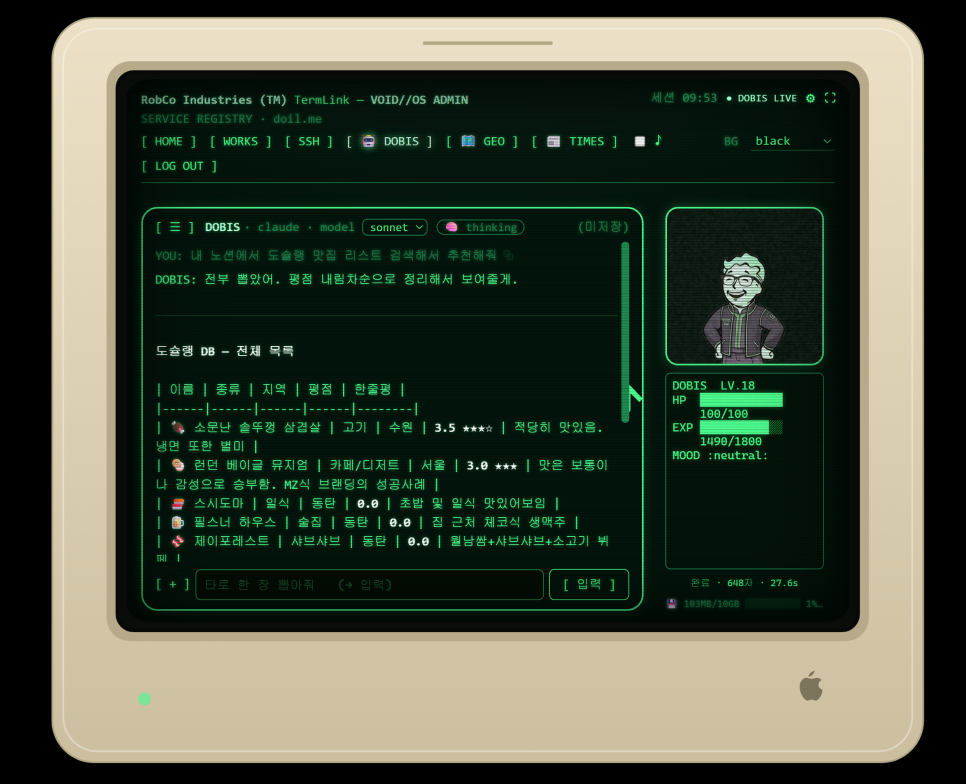
Previously, for DOBIS to understand the structure of my Notion wiki,
it either had to search using the slow Notion API,
or use the primitive method of reading the entire indexed notion_meta.json file every single time.
The moment the file size exceeds a few megabytes, this approach becomes a massive waste of context tokens and a prime cause of processing delays.
To solve this problem, I built MCP (Model Context Protocol) server functionality into DJinn as a default feature.
Simply by running a single line of code, serveMcp(db), when initializing the library,
dedicated tools corresponding to each database collection are automatically generated and exposed.
Now, when DOBIS needs information from my wiki, it no longer has to laboriously dig through the entire file.
It calls the tools it needs and queries the database with great precision, fetching only the exact piece it wants.
Just as smartly as Iron Man's JARVIS.
댓글 0